
Adding players
To add players to a team, select the desired competition and access the ‘Teams’ tab. Select a team, and choose the ‘Add Player’ option to either select a player from our database or create a new player.
If the desired player is not already in our database, you will need to create them and submit their information for review. The essential details required for every player to be approved are name, date of birth, nationality, and position.
When inputting the player's name, ensure that it is written with only the first letter of the name and surname capitalized (e.g., ‘Thiago Motta’), as this will enable our admins to approve the player with minimal edits.
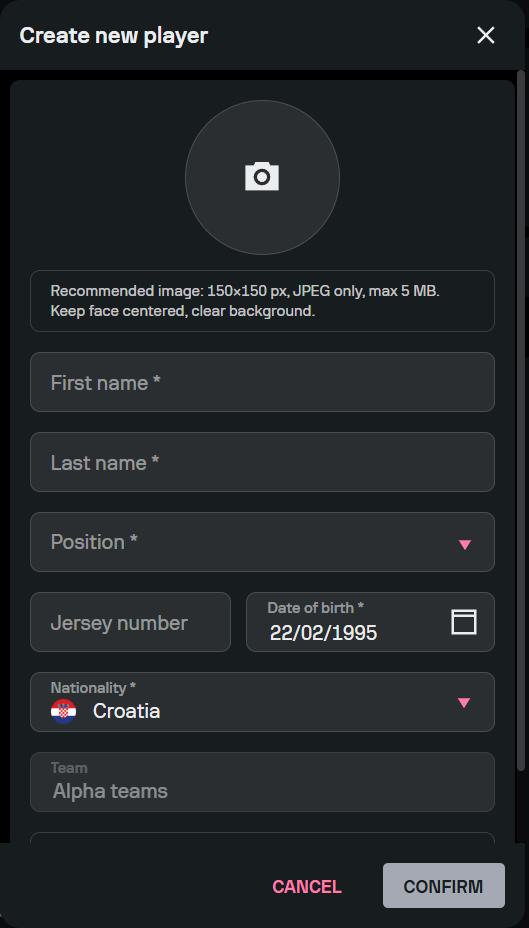
Keep in mind that we currently don’t accept player nicknames; Torneo currently supports only official full names and surnames. Therefore, if you attempt to name a player by their nickname, such as ‘Neymar Jr’ or ‘Dida’, the player will be rejected.
Also, make sure to input the correct date of birth, as this information helps us distinguish between different players with the same name. Keep in mind that any players submitted without a valid date of birth cannot be approved by our admins. For example, if you submit a list of players and set all of their birth dates as January 1, 2003, your submission will be rejected.
You can also add the player’s photo and shirt number. When uploading a player photo, choose a high-quality front-facing portrait with a clear white background. If necessary, our admins will then adapt the photo to fit Torneo specifications.